407 Proxy Authentication Required: Causes and Tested Fixes

407 Proxy Authentication Required means the proxy between you and the website refused your request because it did not receive valid proxy credentials. The website never saw the request. The fix is always on the client side: send the right username and password, in the place your client actually reads them.
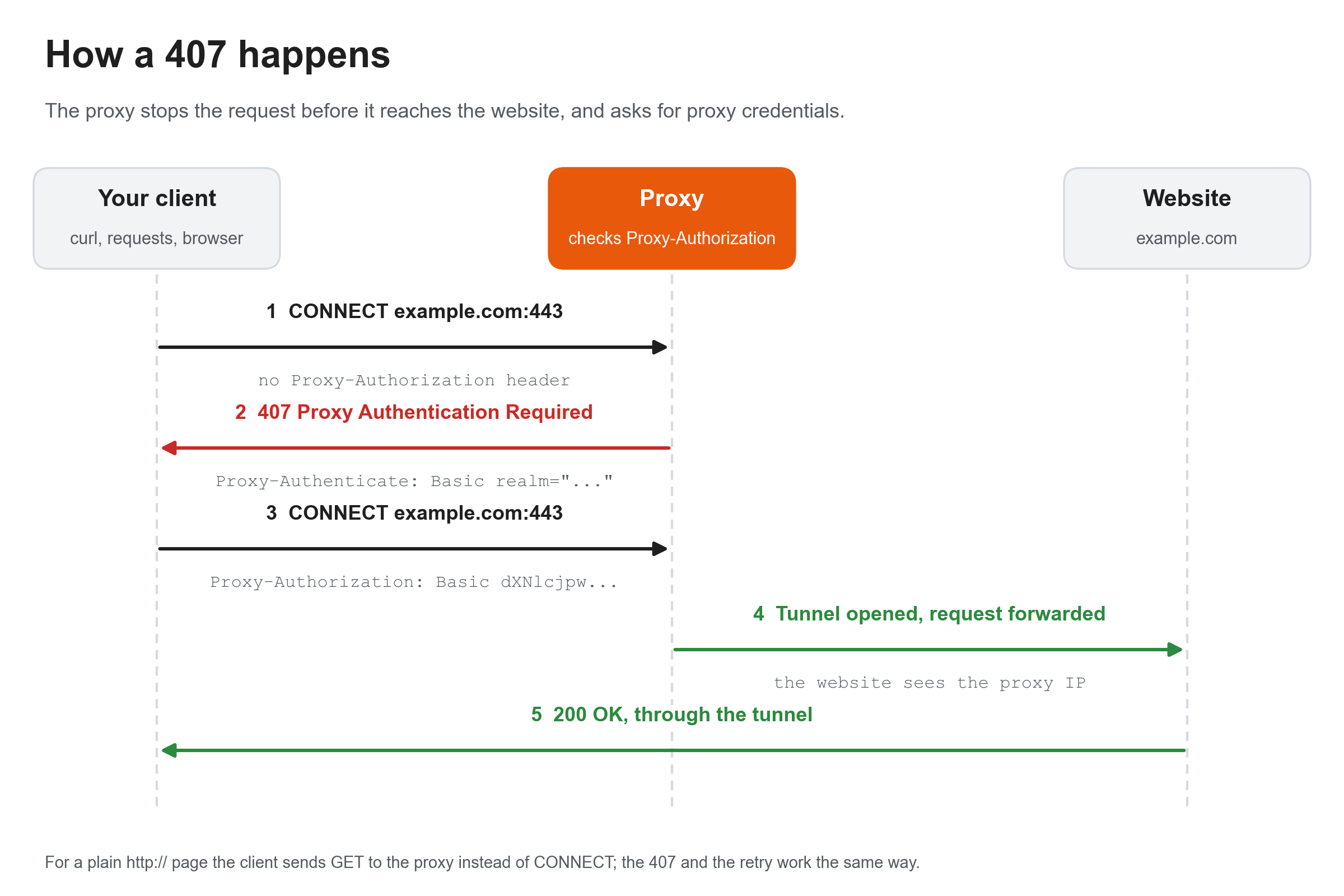
Every error message and fix below was reproduced on November 26, 2026 against a small local proxy that requires Basic authentication, with curl 8.7, Python requests 2.34, axios 1.21, undici 8.13, Selenium 4.54, Puppeteer 25.19 and Playwright 1.65 on Chrome. The credentials in the examples are placeholders.
What does 407 Proxy Authentication Required mean?
HTTP 407 is a client error returned by a proxy, not by the website: the proxy wants credentials and the request had none, or had wrong ones. It is defined in RFC 9110 and works like 401, but for the proxy hop.
The proxy's answer looks like this (captured with curl -v):
< HTTP/1.1 407 Proxy Authentication Required
< Proxy-Authenticate: Basic realm="local-test"
< Content-Length: 0
< Connection: close
The Proxy-Authenticate header names the scheme the proxy accepts. Most scraping and residential proxies use Basic. The client is expected to retry with a Proxy-Authorization header:
Proxy-Authorization: Basic dXNlcjpwQHNzOndvcmQ=
The value is username:password encoded in Base64. It is encoding, not encryption, which is one reason to keep proxy credentials out of logs and screenshots.
What is the difference between 401, 403 and 407?
A 401 comes from the website and asks for website credentials, a 407 comes from the proxy and asks for proxy credentials, and a 403 means whoever answered understood who you are and still refused.
| Status | Who answers | What it wants | Header to send |
|---|---|---|---|
| 401 Unauthorized | The website | Website login | Authorization |
| 407 Proxy Authentication Required | The proxy | Proxy login | Proxy-Authorization |
| 403 Forbidden | The website or the proxy | Nothing you can send fixes it | None |
The practical consequence: if you get a 407, changing headers, cookies or user agents for the target site does nothing. The request is stopped one hop earlier.
Why do I get 407 on HTTPS sites but no status code at all?
For HTTPS targets the client first asks the proxy to open a tunnel with a CONNECT request, and the proxy's 407 answers that CONNECT. Most clients report it as a connection error instead of an HTTP response, because there is no response from the website to show.
Here is the same missing-credentials request, sent to a plain HTTP page and to an HTTPS page:
curl -s -o /dev/null -w "%{http_code}\n" -x http://127.0.0.1:8899 http://127.0.0.1:8088/
# 407

curl -sS -x http://127.0.0.1:8899 https://example.com/ -o /dev/null
# curl: (56) CONNECT tunnel failed, response 407
Python requests behaves the same way: 407 as a status code for HTTP pages, and an exception for HTTPS pages:
ProxyError(... Caused by ProxyError('Unable to connect to proxy',
  OSError('Tunnel connection failed: 407 Proxy Authentication Required')))
So search your logs for "Tunnel connection failed: 407", "CONNECT tunnel failed" and ERR_INVALID_AUTH_CREDENTIALS, not only for the number 407.
What causes a 407 error?
A 407 has one meaning, but several causes. Work through them in this order, because the first ones are the most common:
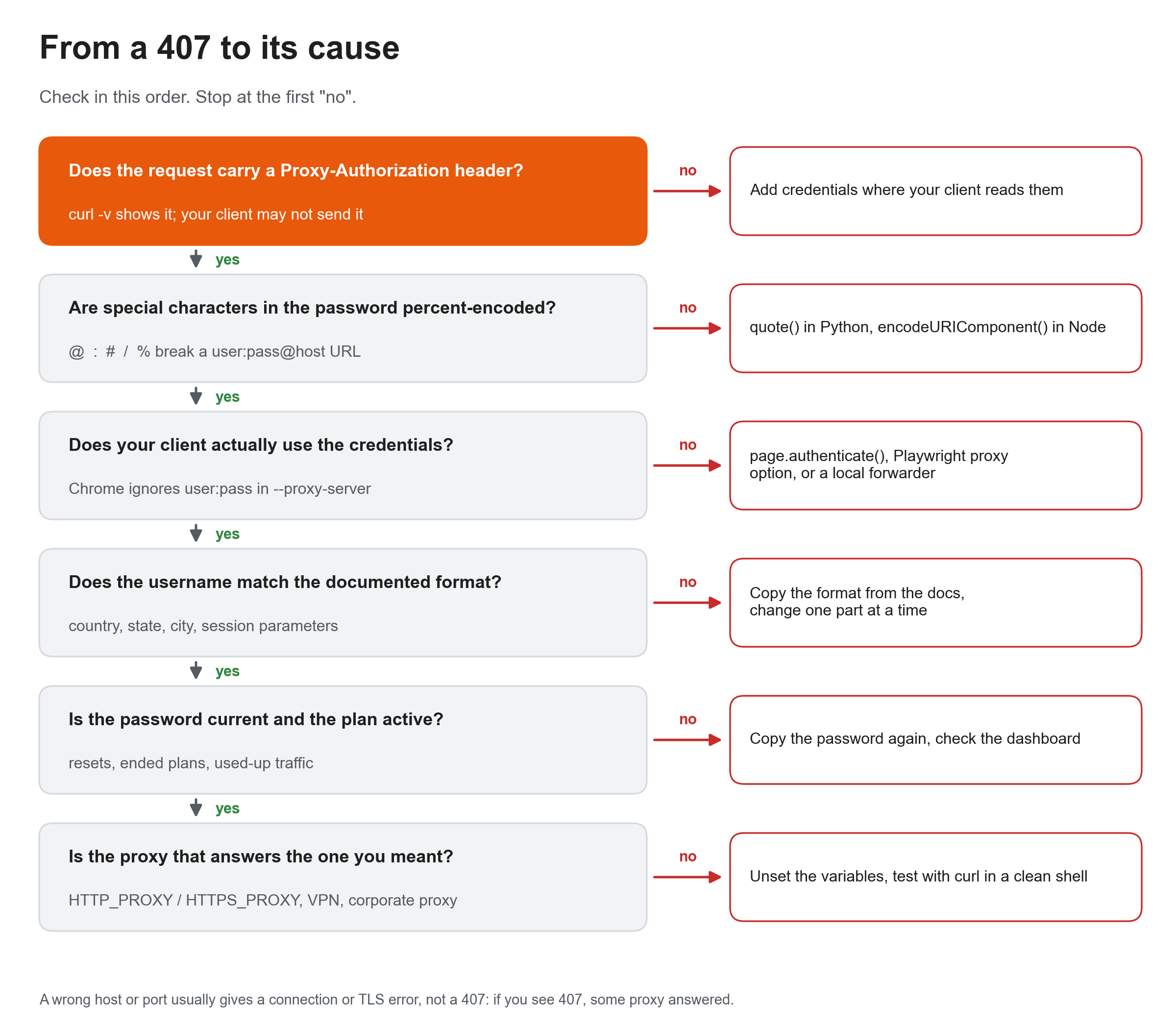
- No credentials sent. The proxy URL has no
user:pass@, or the client ignores the credentials you passed. - Wrong credentials. A typo, an old password after a reset, or residential credentials used on a datacenter endpoint.
- Special characters not URL-encoded.
@,:,#,/or%in the password break the proxy URL. - Credentials that the client drops. Chrome ignores
user:pass@inside--proxy-server, so Selenium and Puppeteer need another way. - A malformed username. Providers that put targeting parameters in the username, such as country or session, expect an exact format.
- The account cannot use the proxy. Some providers answer 407 when a plan has ended or its traffic is used up. Check your dashboard.
- A different proxy answered. An
HTTP_PROXYorHTTPS_PROXYvariable, or a corporate proxy, sits in front of the proxy you meant to use.
A wrong host or port usually does not produce a 407. It produces a connection, TLS or timeout error, because nothing that speaks proxy-auth answered. If you see 407, you are talking to a proxy, and the question is which one and with what credentials.
How do I fix 407 in curl?
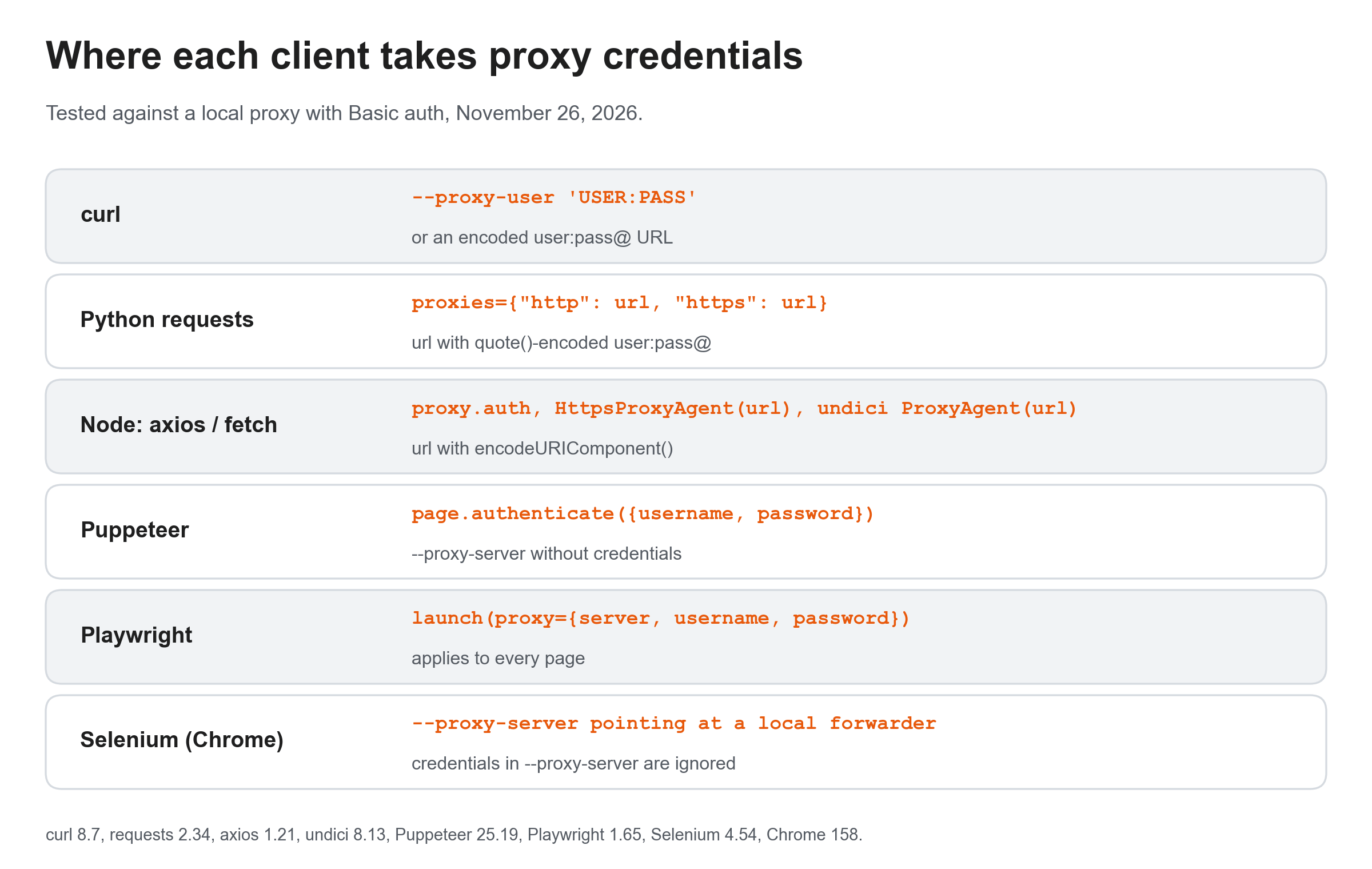
Pass the credentials with --proxy-user, which takes them as-is, or put them in the proxy URL with every special character percent-encoded.
With a password of p@ss:word, the raw URL fails before anything is sent, because curl reads the first @ as the end of the credentials:
curl -sS -x 'http://user:p@ss:word@127.0.0.1:8899' https://example.com/
# curl: (5) Unsupported proxy syntax in 'http://user:p@ss:word@127.0.0.1:8899':
#   Port number was not a decimal number between 0 and 65535
Both of these return 200:
# Credentials as a separate option, no encoding needed
curl -x http://127.0.0.1:8899 --proxy-user 'user:p@ss:word' https://example.com/

# Credentials in the URL, percent-encoded (@ = %40, : = %3A)
curl -x 'http://user:p%40ss%3Aword@127.0.0.1:8899' https://example.com/
A wrong password still gets curl: (56) CONNECT tunnel failed, response 407, so if --proxy-user fails too, the credentials themselves are wrong. More curl proxy options are in our curl with proxy guide.
How do I fix 407 in Python requests?
Build the proxy URL with the username and password passed through urllib.parse.quote(..., safe=''), and use the same URL for both http and https.
from urllib.parse import quote
import requests

user, password = "user", "p#ss/w0rd"
proxy = f"http://{quote(user, safe='')}:{quote(password, safe='')}@127.0.0.1:8898"

r = requests.get("https://example.com/", proxies={"http": proxy, "https": proxy}, timeout=30)
print(r.status_code)  # 200
Without the encoding, a # or / in the password breaks URL parsing before any request is sent:
InvalidURL: Failed to parse: 'user:p' is not a valid host or port
Two more things to check in requests:
- Both schemes. A
proxiesdict with only an"http"key sends HTTPS requests directly, or through whateverHTTPS_PROXYsays. - Environment variables. requests reads
HTTP_PROXY,HTTPS_PROXYandNO_PROXYby default. If a variable points at another proxy, that proxy may be the one answering 407. Printrequests.utils.get_environ_proxies("https://example.com/")to see what is picked up.
Our Python requests proxy guide covers sessions and rotation.
How do I fix 407 in Node.js with axios or fetch?
Give axios the credentials in proxy.auth, or use an agent such as https-proxy-agent with encoded credentials in its URL. For Node's fetch, use an undici ProxyAgent with credentials in its URI or a token.
import axios from 'axios';
import { HttpsProxyAgent } from 'https-proxy-agent';
import { ProxyAgent, fetch } from 'undici';

const user = 'user';
const pass = 'p@ss:word';
const proxyUrl = `http://${encodeURIComponent(user)}:${encodeURIComponent(pass)}@127.0.0.1:8899`;

// axios, built-in proxy option
const a = await axios.get('https://example.com/', {
  proxy: { protocol: 'http', host: '127.0.0.1', port: 8899, auth: { username: user, password: pass } },
});

// axios with an agent (turn the built-in proxy off)
const b = await axios.get('https://example.com/', {
  proxy: false,
  httpsAgent: new HttpsProxyAgent(proxyUrl),
});

// fetch through undici
const c = await fetch('https://example.com/', { dispatcher: new ProxyAgent(proxyUrl) });

console.log(a.status, b.status, c.status); // 200 200 200
Without credentials, axios reports HTTP 407 in both setups. fetch is less helpful: it throws a bare TypeError: fetch failed, and the 407 is not in the message. If a fetch through a proxy fails, test the same proxy with curl before you debug anything else.
How do I fix 407 in Selenium?
Chrome does not use credentials written into --proxy-server, so Selenium needs the credentials supplied another way. The simplest reliable option is a local forwarding proxy that adds them for every request.
Here is what each Selenium setup does against an authenticating proxy in headless Chrome:
| Setup | What happened |
|---|---|
--proxy-server=http://user:pass@host:port | Chrome rejects the proxy setting, page shows "This site can't be reached" |
--proxy-server=http://host:port, no credentials | Empty page: Chrome receives the 407 and has nobody to ask |
--proxy-server pointed at a local forwarder that adds credentials | Page loads |
Selenium BiDi driver.network.add_auth_handler() | Timed out in our run (Chrome 158, Selenium 4.54) |
A forwarder takes one line. pproxy, an open source (MIT) Python proxy, listens locally without authentication and forwards to the real proxy with your credentials:
pip install pproxy
pproxy -l http://127.0.0.1:8081 -r 'http://PROXY_HOST:PROXY_PORT#USERNAME:PASSWORD'
from selenium import webdriver
from selenium.webdriver.chrome.options import Options

options = Options()
options.add_argument("--headless=new")
options.add_argument("--proxy-server=http://127.0.0.1:8081")  # the local forwarder

driver = webdriver.Chrome(options=options)
driver.get("https://example.com/")
print(driver.title)  # Example Domain
driver.quit()
Keep the forwarder on 127.0.0.1 so that nobody else on your network can use your proxy account through it. The same trick works for any tool that cannot send proxy credentials.
How do I fix 407 in Puppeteer and Playwright?
In Puppeteer, start Chrome with --proxy-server and no credentials, then call page.authenticate() before the first navigation. In Playwright, pass username and password in the proxy launch option.
What we got in Puppeteer:
creds in --proxy-server:   net::ERR_NO_SUPPORTED_PROXIES at https://example.com/
no page.authenticate():    net::ERR_INVALID_AUTH_CREDENTIALS at https://example.com/
page.authenticate():       200 Example Domain
The working version:
const puppeteer = require('puppeteer');

(async () => {
  const browser = await puppeteer.launch({
    args: ['--proxy-server=http://PROXY_HOST:PROXY_PORT'],
  });
  try {
    const page = await browser.newPage();
    await page.authenticate({ username: 'USERNAME', password: 'PASSWORD' });
    const response = await page.goto('https://example.com/');
    console.log(response.status(), await page.title()); // 200 Example Domain
  } finally {
    await browser.close();
  }
})();
page.authenticate() applies to one page. Call it again for every new page you open.
Playwright takes the credentials at launch, so they apply to every page in the browser:
from playwright.sync_api import sync_playwright

with sync_playwright() as p:
    browser = p.chromium.launch(proxy={
        "server": "http://PROXY_HOST:PROXY_PORT",
        "username": "USERNAME",
        "password": "PASSWORD",
    })
    page = browser.new_page()
    response = page.goto("https://example.com/")
    print(response.status, page.title())  # 200 Example Domain
    browser.close()
Without username and password, Playwright fails with net::ERR_INVALID_AUTH_CREDENTIALS. Our guides on proxies in Playwright and rotating proxies in Puppeteer go further.
Why do I get 407 when my username has parameters?
Residential proxy providers often read targeting options from the username, so customer-USERNAME-country-us is a different string from customer-USERNAME-country_us, and only the documented one matches your account. Copy the format from the provider's documentation and change one parameter at a time.
On ScrapingAnt residential proxies, the setup documentation lists the connection details:
- Host
residential.scrapingant.com, port8080for an HTTP proxy and443for an HTTPS proxy - Basic authorization with the username and password from your account settings
- Targeting in the username:
customer-USERNAME-country-us,customer-USERNAME-state-us_california,customer-USERNAME-city-us_los_angeles, and a sticky session with-sessionid-123456789
A complete test from the documentation:
curl --proxytunnel --proxy "https://residential.scrapingant.com" \
  --proxy-user "customer-USERNAME-country-us:PASSWORD" \
  https://scrapingbin.link/ip
If the plain username works and the one with parameters returns 407, the parameter part is the problem. If neither works, check the password first.
Why did my proxy start returning 407 after it worked before?
When working code suddenly gets 407, the credentials changed or the account changed, not your code. The usual reasons:
- The password was reset. On ScrapingAnt, resetting proxy credentials changes the password and ends active sessions. Datacenter passwords can take up to 15 minutes to apply. Every script, CI secret and browser profile that holds the old password now fails.
- The plan ended or its traffic is used up. Check the plan status in your dashboard before you rotate anything else.
- Something new sits in front. A new
HTTPS_PROXYvariable on a server, a VPN client, or a corporate proxy that now requires its own login. Corporate proxies often want Windows credentials through NTLM or Kerberos, which is a different fix from a scraping proxy.
How do I test proxy credentials quickly?
Send one request with curl and nothing else in the way. If curl gets a 200, the credentials and the proxy are fine and the problem is in your client; if curl gets a 407, the credentials or the username format are wrong.
curl -sS -v -x http://PROXY_HOST:PROXY_PORT --proxy-user 'USERNAME:PASSWORD' https://example.com/ -o /dev/null 2>&1 \
  | grep -E 'CONNECT|HTTP/|Proxy-'
The verbose output shows whether a Proxy-Authorization header went out and what the proxy answered. Run it in a clean shell (env -u HTTP_PROXY -u HTTPS_PROXY) if you suspect environment variables.
Key takeaways
- 407 comes from the proxy, not the website. Fix the proxy credentials, not the request to the site.
- On HTTPS pages the 407 hides inside errors like "CONNECT tunnel failed" or "Tunnel connection failed".
- Percent-encode the username and password whenever they go into a URL.
- Chrome ignores credentials in
--proxy-server: usepage.authenticate()in Puppeteer, theproxyoption in Playwright, and a local forwarder in Selenium. - Copy username parameters exactly from your provider's documentation, and check the plan and password after any sudden change.
If you need a residential pool with country, state and city targeting set in the username, see ScrapingAnt residential proxies and the proxy setup guide.